During a run the MDX-400 log scrolls fast, but some numbers you want in view all the time: speed, torque, MOSFET temperature and the voltage of each of the 13 cells. The drive keeps them in two tables that stay put: Drive status in Window 1 and Battery status in Window 2. Each row is one short text line from the firmware, and a new line replaces the old row.
What the firmware prints
Status windows use SerialFlow’s prefixed text commands. These are the ones for writing rows:
| Command | Format | What it does |
|---|---|---|
| Write Line | ~WrLi{W}:{n}:{text} | Write text to line n of window W |
| Update Line | ~UpLi{W}:{n}:{text} | Overwrite line n |
| Insert Line | ~InLi{W}:{n}:{text} | Insert a new line at n; the lines below move down |
| Delete Line | ~DeLi{W}:{n} | Delete line n; the lines below move up |
| Clear All | ~ClA{W}: | Clear the whole window |
| Field | Meaning |
|---|---|
~ | The prefix: SerialFlow reads the line as a command, so it does not appear in the log |
WrLi | The command, 2 to 4 characters |
{W} | The window, one digit: 0 is the main terminal, 1 to 9 are status windows |
{n} | The line number in that window, counted from 0 |
{text} | The row as it should look, colour codes included, up to the end of the line |
The MDX-400 feed needs only one of them, ~WrLi, for 25 rows: 9 in Window 1 and 16 in Window 2. It writes every row
once at the start, then rewrites one row at a time. A new ~WrLi replaces the whole row. In this release ~UpLi does
exactly the same, so use whichever reads better in your code.
Three real lines from showcase_live.txt, with ESC (0x1B) written as \x1B:
~WrLi1:4:       \x1B[37mSpeed        \x1B[1;97m 2 594 rpm      \x1B[90mset 2 600
~WrLi1:8:       \x1B[37mMOSFET       \x1B[92m  35.3 °C       \x1B[92m███
~WrLi2:15:       \x1B[37mCell 13      \x1B[96m3.685 V      \x1B[96m████████████
The two tables
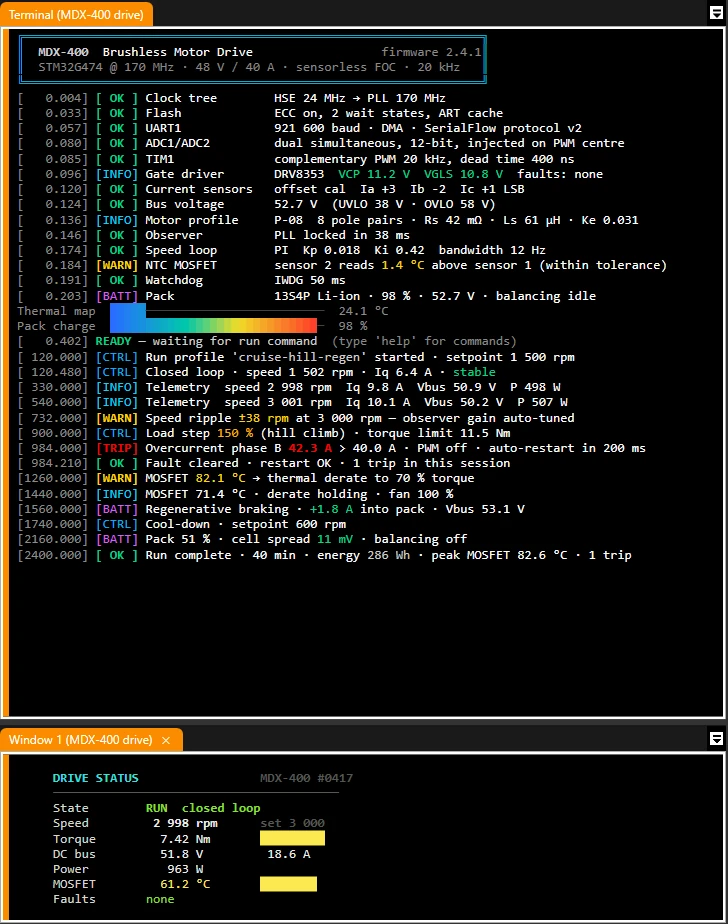
Window 1, Drive status, at the end of the preloaded run:
DRIVE STATUS                 MDX-400 #0417
────────────────────────────────────────
State        RUN  closed loop
Speed         2 998 rpm      set 3 000
Torque         7.42 Nm       █████████
DC bus         51.8 V         18.6 A
Power           963 W
MOSFET         61.2 °C       ████████
Faults       none
| Line | Row | What it shows |
|---|---|---|
| 1 | DRIVE STATUS | The title, and the unit’s number in grey |
| 2 | ──── | A 40-character rule |
| 3 | State | READY, RUN closed loop, RUN derate 70 %, RUN regen braking, RUN cool-down or TRIP overcurrent. Bold green while running, bold yellow otherwise |
| 4 | Speed | Measured speed in rpm, then the setpoint in grey |
| 5 | Torque | Motor torque in Nm, with a 14-block bar that is full at 12 Nm |
| 6 | DC bus | Bus voltage and bus current |
| 7 | Power | Bus voltage × bus current, in W |
| 8 | MOSFET | MOSFET temperature, with a 14-block bar from 20 °C (empty) to 90 °C (full) |
| 9 | Faults | none in green, or the active fault, such as OC phase B, in bold red |
Window 2, Battery status, at the same moment:
BATTERY PACK      13S4P Li-ion         51 %
────────────────────────────────────────
Cell  1      3.757 V      ██████
Cell  2      3.756 V      █████
…
Cell  7      3.750 V      █
…
Cell 10      3.764 V      ████████████
…
Cell 13      3.764 V      ████████████
Spread        14 mV       Pack temp     29.4 °C
| Line | Row | What it shows |
|---|---|---|
| 1 | BATTERY PACK | The pack type and its state of charge |
| 2 | ──── | A 40-character rule |
| 3 to 15 | Cell 1 to Cell 13 | The voltage of each of the 13 series cells, with a 16-block balance bar: the cell against the pack average, where 10 mV below the average is empty and 10 mV above is full. The lowest cell is yellow, the highest cyan, the rest green |
| 16 | Spread, Pack temp | Highest minus lowest cell voltage, and the pack temperature |
How the colours and bars are made
Nothing here is graphics. Each colour is a standard 16-colour ANSI code, set once in front of the text it colours:
37 white for the labels, 90 grey, 97 bright white for most values, 92 green, 93 yellow, 91 red, 96 cyan and
95 magenta. A 1; in front makes it bold, as in 1;96 for the Drive title.
The bars are the Unicode full block █ (U+2588), repeated. The firmware scales the value to the bar width, rounds it
and prints at least one block. Each bar has one colour, picked by level: green below 55 % of full scale, yellow below
80 %, red from 80 %. For the MOSFET row that means green below 58.5 °C, yellow up to 76 °C and red from 76 °C. In the
window the blocks join up into a solid bar.
In showcase_live.txt every eighth graph sample is followed by a status update: the Speed row, the Torque row, DC bus
and Power, the MOSFET row, or the battery header with one cell and the Spread row, in turn. Over the 1 min 50 s tail
that adds up to 1 145 ~WrLi lines. showcase_text.txt has no graphs and alternates one log line with one status
line.
Set it up in SerialFlow
There is nothing to configure. A status window opens the first time a line names it.
- Connect to the port as usual: pick the port and the baud rate, then press Connect.
- The first
~WrLi1:line opens a Window 1 tab next to Terminal, and the first~WrLi2:line opens Window 2. The command lines themselves stay out of the log. - Click a tab to see its table. To see a table and the log at once, drag the Window 1 tab onto the lower dock target of the terminal pane.
- While you write your own firmware, ☰ → View → Raw Display (Ctrl+R) shows the
~WrLilines as plain text in the log. Switch it off again and new lines update the tables.
The result
In your own firmware
The same kind of table from your own firmware, in plain C with printf. This version starts at line 0; the MDX-400
starts at line 1, which leaves an empty row at the top.
#include <stdio.h>
#define RST "\x1B[0m"

/* green below 55 %, yellow below 80 %, red above: the MDX-400 levels */
static const char *level(float v)
{
    return v < 0.55f ? "\x1B[92m" : v < 0.80f ? "\x1B[93m" : "\x1B[91m";
}

void status_init(void)
{
    printf("~ClA1:\n");                                 /* clear window 1 */
    printf("~WrLi1:0:\x1B[1;96mDRIVE STATUS" RST "\n");
}

void status_update(int rpm, int set, float mosfet_c)
{
    float v = (mosfet_c - 20.0f) / 70.0f;               /* 20..90 C -> 0..1 */
    int n = (int)(v * 14.0f + 0.5f);                    /* 1..14 blocks */
    n = n < 1 ? 1 : (n > 14 ? 14 : n);
    printf("~UpLi1:1:Speed   %6d rpm  \x1B[90mset %d" RST "\n", rpm, set);
    printf("~UpLi1:2:MOSFET  %s%6.1f \xC2\xB0" "C  ", level(v), mosfet_c);
    while (n--) printf("\xE2\x96\x88");                 /* U+2588 full block */
    printf(RST "\n");
}
Call status_update() as often as the values change; each call rewrites two rows and nothing scrolls. On Arduino,
Serial.print the same strings.
Good to know
- Each port has up to 9 status windows, each in its own tab. Window 0 is the main terminal, so
~WrLi0:writes into the log window itself. - Lines count from 0. Writing line 5 into an empty window leaves lines 0 to 4 empty.
- A row is replaced whole, so a shorter value leaves no old characters behind. Pad with
printfwidths to keep the columns straight. - Colour a row with ANSI codes, or with the short tags
<R>…</R>,<G>…</G>,<B>,<Y>,<C>,<M>and<W>. - Each command starts its own line and ends with a line feed. A row that reaches the PC in two pieces (two serial reads) still works: SerialFlow waits for the rest of the line.
- The long forms
WRITE_LINE:,UPDATE_LINE:andCLR_ALLwork too, but only for the main terminal (window 0). The short form is also smaller:~UpLi0:3:datais 15 bytes,UPDATE_LINE:3:datais 19. - Delayed Playback clears the text windows before it starts, so a playback file has to write its tables again. The MDX-400 files do.
Try it yourself
- Start SerialFlow. You don’t need to connect a port.
- ☰ → Test → Load Test File →
Demo→showcase_preload.txt. The tabs Window 1 and Window 2 appear next to Terminal. Click them to see the drive and battery tables. - ☰ → Test → Delayed Playback →
Demo→showcase_live.txt. For about 1 min 50 s the rows change in place while the log scrolls. - ☰ → Test → Delayed Playback →
Demo→showcase_text.txt. Text only and faster: the State row goes fromREADYthrough a trip, a thermal derate and regen braking. - Drag the Window 1 tab under the terminal to watch the table and the log together.
- During playback, switch on ☰ → View → Raw Display to see the
~WrLilines themselves, then switch it off.