The MDX-400 speed loop prints one graph line per 10 ms sample. On a long bench cable, one flipped bit turns a
setpoint of 3000 rpm into 7000, and the graph shows a speed spike that never happened. So in this scene every
speed frame carried a CRC-8, and a script added 23 single faults to the feed. SerialFlow had to keep every broken line
off the graph and say what was wrong with each one.
What the firmware prints
Graph A (Speed Control) gets one line per sample with the CRC on the end. Graph B (Thermal & Battery) is a slow
channel and sends its lines without one. Copied from showcase_rx_errors.txt:
~{A:1:3000:3004.9}*7E
~{A:1:3000:3004.1}*D6
~{A:1:3000:3004.0}*C3
~{B:0:40.1332:33.86:25.07:47.62:53.17}
| Part | Meaning |
|---|---|
~{ … } | One graph command |
A, B | The graph id: A is Speed Control, B is Thermal & Battery |
1 | Add data, with an X that counts up by one per line |
0 | Add data with its own X value, here 40.1332 minutes |
3000:3004.9 | The values in signal order: setpoint 3000 rpm, speed 3004.9 rpm |
33.86:25.07:47.62:53.17 | Motor winding °C, MOSFET °C, pack voltage V, state of charge % |
*7E | The optional CRC-8 of the line, as two uppercase hex digits |
The CRC-8 check
SerialFlow checks the CRC on every graph line that ends in * and two hex digits. The rules:
- Polynomial
0x07(x⁸ + x² + x + 1), start value0. - It covers every character from
{to}, both braces included. The~and the*7Eare not part of it. - The result is one byte, sent as two uppercase hex digits after
*. - If the CRC does not match, the line is dropped: it never reaches the graph, and the RX Error Collector lists it.
For ~{A:1:3000:3004.9}*7E, the CRC runs over the 17 characters {A:1:3000:3004.9} and gives 0x7E. The checksum
calculator uses the same CRC-8, so you can check any line by hand:
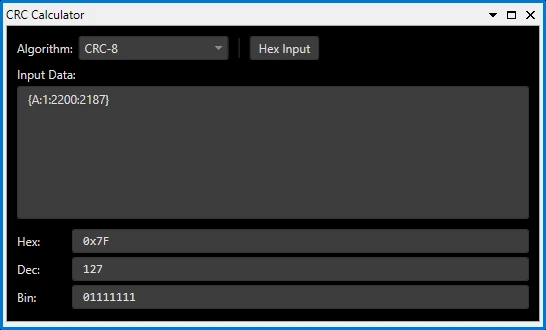
{A:1:2200:2187} is 0x7F, so the line goes out as ~{A:1:2200:2187}*7F.What the noise did
One real line of each kind of fault:
| Line as received | What happened | Error Reason | Category |
|---|---|---|---|
~{A:1:7000:3003.1}*B4 | One bit flipped: setpoint 3000 became 7000 | CRC mismatch (expected 0xB4, got 0xC7) | CRC |
~{A:1:3000:300 | Line cut off before the } | Missing closing brace | Structure |
~{b:0:40.9324:33.00:…} | B (0x42) became b (0x62) | Invalid graph ID 'b' (not A-Z) | Command |
~{B:p:40.0999:33.88:…} | 0 (0x30) became p (0x70) | Unknown command code 'p' | Command |
~{B:0z40.2997:33.80:…} | : (0x3A) became z (0x7A) | Format error: no colon after command code | Format |
Expected is the CRC that came with the line; got is the CRC computed from what arrived. The graph B faults were caught only because they broke the line’s structure. A flipped digit in a graph B value would reach the graph unchecked.
Set it up in SerialFlow
- Connect to the port as usual. There is nothing to switch on: SerialFlow checks every graph line that carries a CRC.
- Watch the status bar. Err: counts the rejected graph lines and turns red when it is above 0.
- ☰ → Tools → RX Error Collector… It has been collecting since SerialFlow started, so earlier errors are already in the list.
- Read the summary bar: Total, CRC, Structure, Command, Format and Other. Mostly CRC: bits change on the wire. Mostly Structure: lines are cut short.
- Copy All puts the list on the clipboard as tab-separated text, for a bug report or a spreadsheet. Clear empties the list and resets the counters.
- ☰ → View → CRC Calculator checks a single line by hand: pick CRC-8 and paste the line from
{to}. - ☰ → Tools → Port Details… shows which adapter and driver sit on which COM port.
The result
The RX Error Collector
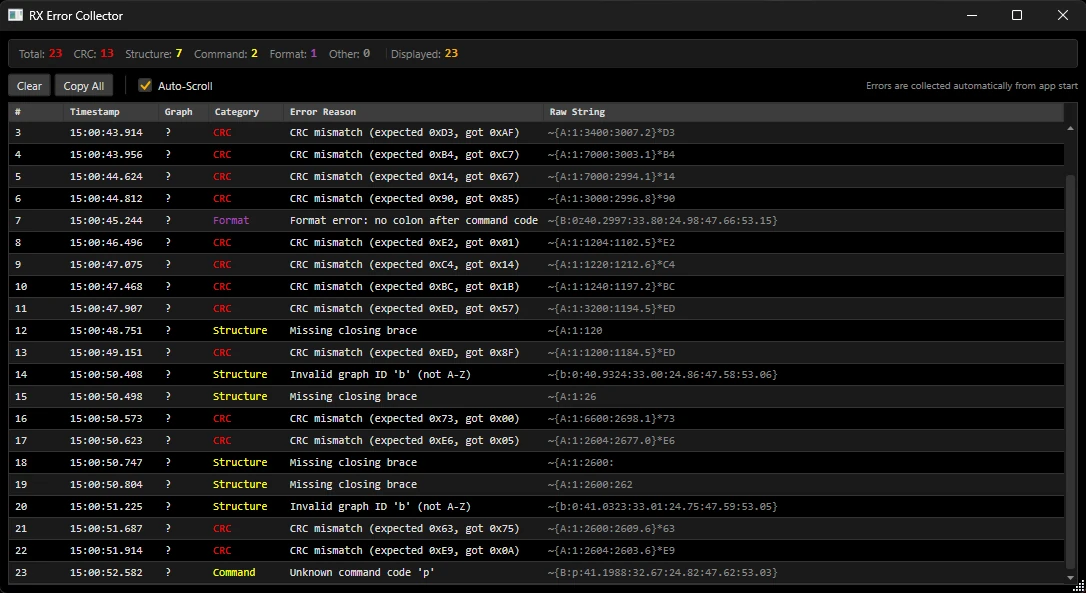
The collector held 23 rejects, exactly the faults in the file: 13 CRC, 7 Structure, 2 Command, 1 Format, 0 Other.
Of the 481 lines that arrived with a CRC, 468 matched. Each row gives the time, graph, category, reason and raw text;
the Graph column shows ? when the graph letter itself was broken. No dropped line reached the Speed Control graph,
so there was no false 7000 rpm spike to explain away.
Checksum calculator and Port Details
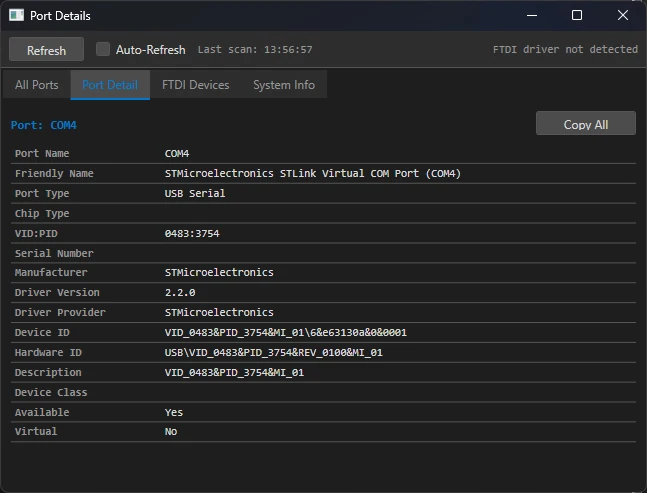
The CRC Calculator takes text, or raw bytes with Hex Input, and shows Hex, Dec and Bin while you type. It has 12
algorithms: CRC-8, CRC-16-CCITT, CRC-16-Modbus, CRC-16-XMODEM, CRC-32, LRC, XOR, Sum8, Sum16, MD5, SHA-1 and SHA-256.
Port Details shows which adapter sits on which COM port; in the picture, an STMicroelectronics ST-Link virtual COM
port on COM4 with VID:PID 0483:3754 and driver 2.2.0.
In your own firmware
The same lines from your own firmware need one short function and no library:
#include <stdio.h>
#include <stdint.h>

/* CRC-8, polynomial 0x07, start value 0, over "{" ... "}" */
uint8_t sf_crc8(const char *s, int len)
{
    uint8_t crc = 0;
    while (len--) {
        crc ^= (uint8_t)*s++;
        for (int i = 0; i < 8; i++)
            crc = (crc & 0x80) ? (uint8_t)((crc << 1) ^ 0x07) : (uint8_t)(crc << 1);
    }
    return crc;
}

/* One sample of graph A (setpoint, speed), protected by CRC-8 */
void send_speed(int setpoint_rpm, float speed_rpm)
{
    char frame[40];
    int n = snprintf(frame, sizeof frame, "{A:1:%d:%.1f}", setpoint_rpm, speed_rpm);
    printf("~%s*%02X\n", frame, sf_crc8(frame, n));
}
/* send_speed(3000, 3004.9f) prints ~{A:1:3000:3004.9}*7E */
Compiled with gcc, this function gives the same CRC as all 468 good lines in showcase_rx_errors.txt. The CRC works
on any graph command, not only data lines: the reference’s own example is ~{A:I:Sensors:500:S:T:F:Sample::0}*C1.
Good to know
- The CRC is optional, per line. A line without
*XXis accepted unchecked, so protect the lines that matter. - One command per line. SerialFlow reads only the first
~{…}on a line. Put the CRC straight after the}. - The collector is always on, from the moment SerialFlow starts, window open or not. It keeps the newest 200 rows by default; the counters keep counting.
- CRC errors point at the link. Check the cable, or lower the baud rate. The Statistics pane counts them too: CRC Rejects, under RX HEALTH, which shows once something has been lost.
- Packed binary mode ends every frame with a CRC-8 too, with the same polynomial.
- Port Details has four tabs: All Ports, Port Detail, FTDI Devices and System Info. Auto-Refresh rescans the ports every 5 seconds. On FTDI Devices, Connect by Serial # connects to the selected adapter, and from then on SerialFlow finds it by its serial number, whatever COM number Windows gives it.
Try it yourself
- Start SerialFlow. You don’t need to connect a port.
- ☰ → Test → Load Test File →
Demo→showcase_preload.txt. Graphs A to D appear. - ☰ → Test → Delayed Playback →
Demo→showcase_rx_errors.txt. Err: in the status bar climbs to 23. - ☰ → Tools → RX Error Collector… shows Total 23: CRC 13, Structure 7, Command 2, Format 1.
- ☰ → View → CRC Calculator, pick CRC-8 and type
{A:1:3000:3004.9}. The result is0x7E, the CRC on the first good line. Now type{A:1:7000:3003.1}: it gives0xC7, not the0xB4that the line carried. - ☰ → Tools → Port Details… lists the COM ports on your own PC.