On the MDX-400 bench the same few commands go out all day: run 1500, stop, fault clear, status. The drive
also asks the PC for things: a watchdog ping every 5 s, and a BMS? query when the pack wants a charge window. We put
the commands on seven Quick Send buttons and four macros, and let six auto-reply rules answer the drive.
What the firmware prints
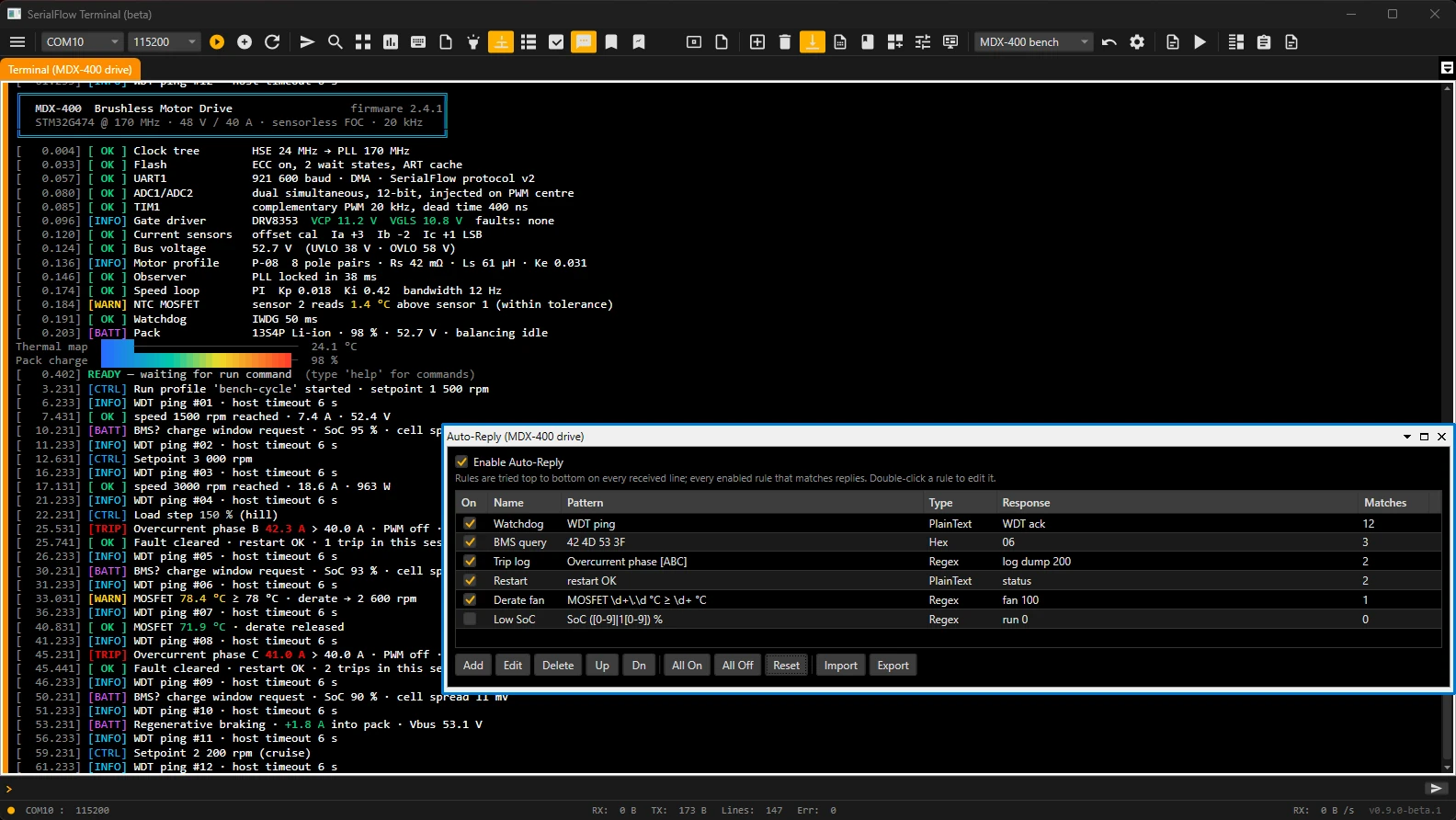
These lines come from the 60-second bench-run log behind the auto-reply picture. A rule or a macro reacts to each one:
[   6.233] [INFO] WDT ping #01 · host timeout 6 s
[   7.431] [ OK ] speed 1500 rpm reached · 7.4 A · 52.4 V
[  10.231] [BATT] BMS? charge window request · SoC 95 % · cell spread 10 mV
[  25.531] [TRIP] Overcurrent phase B 42.3 A > 40.0 A · PWM off · auto-restart in 200 ms
[  25.741] [ OK ] Fault cleared · restart OK · 1 trip in this session
[  33.031] [WARN] MOSFET 78.4 °C ≥ 78 °C · derate → 2 600 rpm
[  53.231] [BATT] Regenerative braking · +1.8 A into pack · Vbus 53.1 V
| The line contains | Who reacts | Times in the 60 s log |
|---|---|---|
WDT ping | rule Watchdog | 12 |
BMS? | rule BMS query (hex) | 3 |
Overcurrent phase B or C | rule Trip log (regex) | 2 |
restart OK | rule Restart | 2 |
MOSFET 78.4 °C ≥ 78 °C | rule Derate fan (regex) | 1 |
speed 1500 rpm, speed 3000 rpm, into pack | the WaitFor steps of the macros | 1 each |
The drive takes short text commands, one per line. This is everything the buttons, macros and rules send:
| Command | What it does | Sent by |
|---|---|---|
drive enable | enables the gate driver | START |
run 1500, run 2200, run 3000 | speed setpoint in rpm | START, the RPM buttons, macros |
stop | ramps down and switches PWM off | STOP, macros |
fault clear | clears a latched fault | FAULT RESET |
status | one-line drive status | STATUS, FAULT RESET, Thermal soak, rule Restart |
load 150, load 100 | load step, in % | Hill climb |
brake regen | regenerative braking | Regen check |
WDT ack, byte 06, log dump 200, fan 100 | answers to the lines above | the rules |
Set it up in SerialFlow
Quick Send buttons
- ☰ → View → Quick Send Buttons. Right-click an empty spot in the panel → Add Button, or click +.
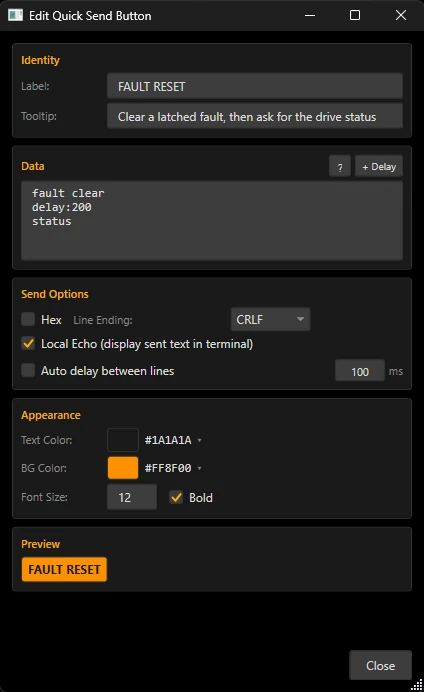
- Right-click the new button → Edit… to open Edit Quick Send Button.
- Type the Label, a Tooltip and the Data. Each line of Data goes out as one command. A line
delay:200waits 200 ms before the next one; + Delay insertsdelay:100at the cursor. - Set Line Ending to
CRLF, pick a Text Color and a BG Color, tick Bold if you want it, then Close.
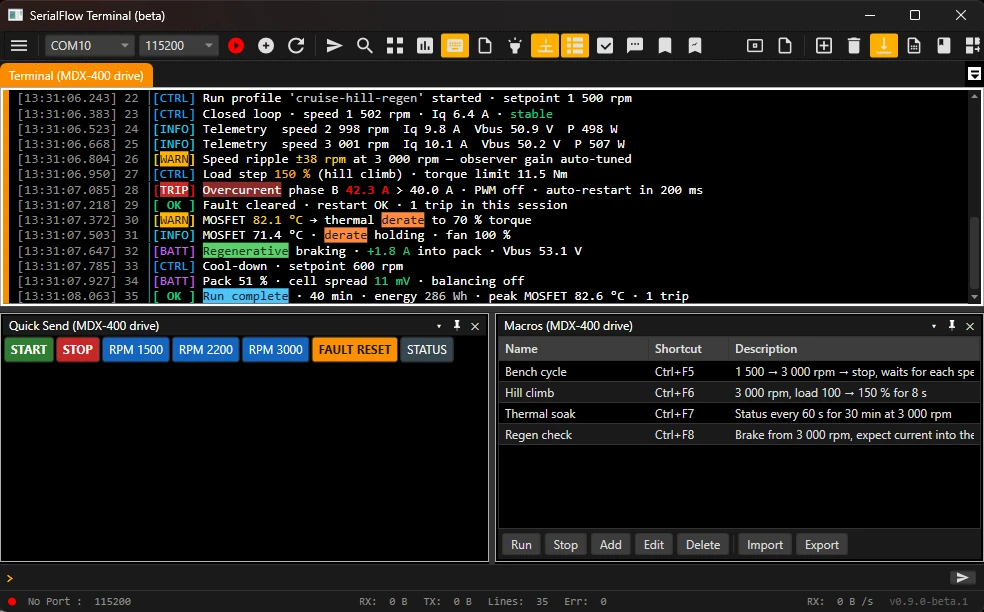
These are the seven MDX-400 buttons:
| Button | Sends, one line each | Background |
|---|---|---|
| START | drive enable, delay:50, run 1500 | #2E7D32 green |
| STOP | stop | #C62828 red |
| RPM 1500, RPM 2200, RPM 3000 | run 1500, run 2200, run 3000 | #1565C0 blue |
| FAULT RESET | fault clear, delay:200, status | #FF8F00 amber, text #1A1A1A |
| STATUS | status | #37474F grey |
All seven end each line with CRLF, echo what they send into the log and use font size 12. START, STOP and FAULT RESET are bold.
Macros
A macro runs a longer sequence, and can wait for the drive’s answer before it goes on.
- ☰ → View → Macros, then Add. Select the new macro and click Edit.
- In Edit Macro, fill in Name, Description, Shortcut and Repeat. Leave Line ending on Use TX setting to use the terminal’s TX line ending (CRLF in the bench profile).
- Add one step per row in the grid: Type (Send, Delay or WaitFor), Data, Delay / Timeout (ms) and Hex. Click OK.
- Select the macro and click Run. Stop cancels it.
| Macro | Shortcut | Steps | Repeat |
|---|---|---|---|
| Bench cycle | Ctrl+F5 | Send run 1500 → WaitFor speed 1500 rpm → Delay 5000 → Send run 3000 → WaitFor speed 3000 rpm → Delay 10000 → Send stop → WaitFor PWM off | 1 |
| Hill climb | Ctrl+F6 | Send run 3000 → WaitFor speed 3000 rpm → Send load 150 → Delay 8000 → Send load 100 | 1 |
| Thermal soak | Ctrl+F7 | Send status → Delay 60000 | 30 |
| Regen check | Ctrl+F8 | Send run 3000 → WaitFor speed 3000 rpm → Send brake regen → WaitFor into pack → Send stop | 1 |
SerialFlow keeps macros in the profile as JSON. This is Thermal soak as stored; step type 0 is Send, 1 is Delay and
2 is WaitFor:
{
  "id": "00000000-0000-0000-0000-000000004103",
  "name": "Thermal soak",
  "description": "Status every 60 s for 30 min at 3 000 rpm",
  "keyboardShortcut": "Ctrl+F7",
  "steps": [
    { "type": 0, "data": "status", "delayMs": 0, "isHex": false },
    { "type": 1, "data": "", "delayMs": 60000, "isHex": false }
  ],
  "repeatCount": 30,
  "isEnabled": true
}
Export in the Macros panel saves every macro to a JSON file in this format, and Import adds the macros from
such a file (a macro with the same id is replaced). Macros also travel inside an exported profile: see
Customise.
Auto-reply rules
- ☰ → View → Auto-Reply and tick Enable Auto-Reply. No rule runs without it.
- Click Add to open the rule editor (Edit, or a double-click, opens it for an existing rule). Fill in
Name, the Match text and its Type (
PlainText,RegexorHex), Case sensitive, the Reply (tick Hex to send bytes), its Line ending, a Delay before reply (ms) and One-shot. OK checks the rule first: a regex must compile, and hex is pairs of hex digits. - Up and Dn set the order. Export saves the list as a JSON file, and Import replaces the list with the rules in such a file.
Three of the six rules, one per match type:
| Name | Type | Pattern | Response | Delay | One-shot |
|---|---|---|---|---|---|
| Watchdog | PlainText | WDT ping | WDT ack | 0 ms | no |
| BMS query | Hex | 42 4D 53 3F | 06, sent as hex | 0 ms | no |
| Trip log | Regex | Overcurrent phase [ABC] | log dump 200 | 50 ms | no |
A hex pattern matches bytes in the received line: 42 4D 53 3F is BMS? in ASCII, and the response 06 goes out as
the ACK byte. The other three rules are Restart (restart OK → status), Derate fan (regex
MOSFET \d+\.\d °C ≥ \d+ °C → fan 100) and Low SoC (regex SoC ([0-9]|1[0-9]) % → run 0, switched off). All
six ignore case.
To try two of the real rules, copy this into Notepad, save it as mdx400_rules.json and Import it:
[
  {
    "id": "00000000-0000-0000-0000-000000004202",
    "name": "Trip log",
    "pattern": "Overcurrent phase [ABC]",
    "patternType": "Regex",
    "response": "log dump 200",
    "responseIsHex": false,
    "delayMs": 50,
    "isEnabled": true,
    "isOneShot": false,
    "caseSensitive": false
  },
  {
    "id": "00000000-0000-0000-0000-000000004203",
    "name": "Restart",
    "pattern": "restart OK",
    "patternType": "PlainText",
    "response": "status",
    "responseIsHex": false,
    "delayMs": 0,
    "isEnabled": true,
    "isOneShot": false,
    "caseSensitive": false
  }
]
The result

In your own firmware
The buttons send each command as a text line ending in CR LF, and so does auto-reply: its text replies end with the TX line ending, CRLF in the bench profile. Beta 1 sent auto-replies with no line ending. This receive handler copes with both, and prints the ping that the Watchdog rule answers:
#include <stdio.h>
#include <string.h>
static char line[64];
static int  len, pings;

void every_5_s(void)                 /* the Watchdog rule answers this line */
{
    printf("[%8.3f] [INFO] WDT ping #%02d · host timeout 6 s\n", now_s(), ++pings);
}

void on_rx_byte(char c)              /* call for every received byte */
{
    if (c != '\r' && c != '\n') {    /* beta 1 sent auto-replies without one */
        if (len < (int)sizeof line - 1) { line[len++] = c; line[len] = '\0'; }
        if (strcmp(line, "WDT ack") == 0) { host_alive(); len = 0; }
        return;
    }
    if (len == 0) return;            /* the LF of CR LF */
    int rpm;
    if (sscanf(line, "run %d", &rpm) == 1)     set_speed(rpm);
    else if (strcmp(line, "stop") == 0)        ramp_down();
    else if (strcmp(line, "fault clear") == 0) clear_fault();
    else if (strcmp(line, "status") == 0)      print_status();
    len = 0;
}
Good to know
- Line endings. A button uses its own Line Ending and a macro its Line ending setting. An auto-reply rule adds its Line ending to a text reply: Use TX setting at first, or None, CR, LF or CRLF. A hex reply goes out exactly as typed. Beta 1 sent every auto-reply with no line ending; a rule from then now gets the TX line ending, so set it to None if your firmware expects nothing after the reply.
- Rule order. Each received line is checked from the top of the list down (Up and Dn move a rule), and
every rule that matches replies, in that order. There is no priority: a
priorityin an older rule file is ignored. Import replaces the whole list. - Whole lines. A line is checked when its line end arrives, so a line that reaches the PC in two pieces is matched
whole. A prompt without a line end, such as
Password:, is checked once nothing has arrived for 200 ms. - WaitFor waits for a received line that contains its Data: plain text, case-sensitive, no regex, and only in the
main terminal, not in status windows. The Delay / Timeout (ms) column is the timeout; 0 means 5 s. On a timeout
the macro stops and the status bar says why, for example
Macro failed: WaitFor step 2: no received line contained "speed 1500 rpm" within 5000 ms. - Shortcuts. Press a macro’s Shortcut to run it on the active port, also while you type in the Transmit box. The editor takes F1 to F24 with or without Ctrl, Shift and Alt, or Ctrl or Alt with a letter or digit (Shift optional). It refuses Ctrl and Alt together, Ctrl+A, C, V, X, Y and Z, Alt+F4, Ctrl+F4, the app’s own shortcuts and a shortcut that another macro has. Holding the keys down does not repeat the macro.
- Matches counts as the lines arrive. A reply that could not go out, for example with no port open, is counted
too, as
2 (2 failed); point at the number for the reason.
Try it yourself
- Save the two rules above as
mdx400_rules.json. - ☰ → View → Auto-Reply, click Import and pick the file. Trip log and Restart appear. Tick Enable Auto-Reply.
- ☰ → Test → Load Test File →
Demo→showcase_preload.txt. The log holds one overcurrent trip and its restart. - ☰ → Test → Delayed Playback →
Demo→showcase_live.txt. About a minute in, a second trip and its restart scroll by, and Matches goes up by one for both rules as they arrive. - With no port connected the replies can’t go out, so Matches shows them as failed, for example
1 (1 failed). On a connected port the reply is sent. - Build FAULT RESET from the button table and check it in the editor’s Preview. It sends once a port is connected.